Zenith · Chrome extension
Arrange a Chrome new tab that fits your work.
Change your new tab’s accent color and background for free. Preview Zenith Pro for seven days to move and resize sections, choose visible widgets, and adjust section styling.
Add Zenith to Chrome ↗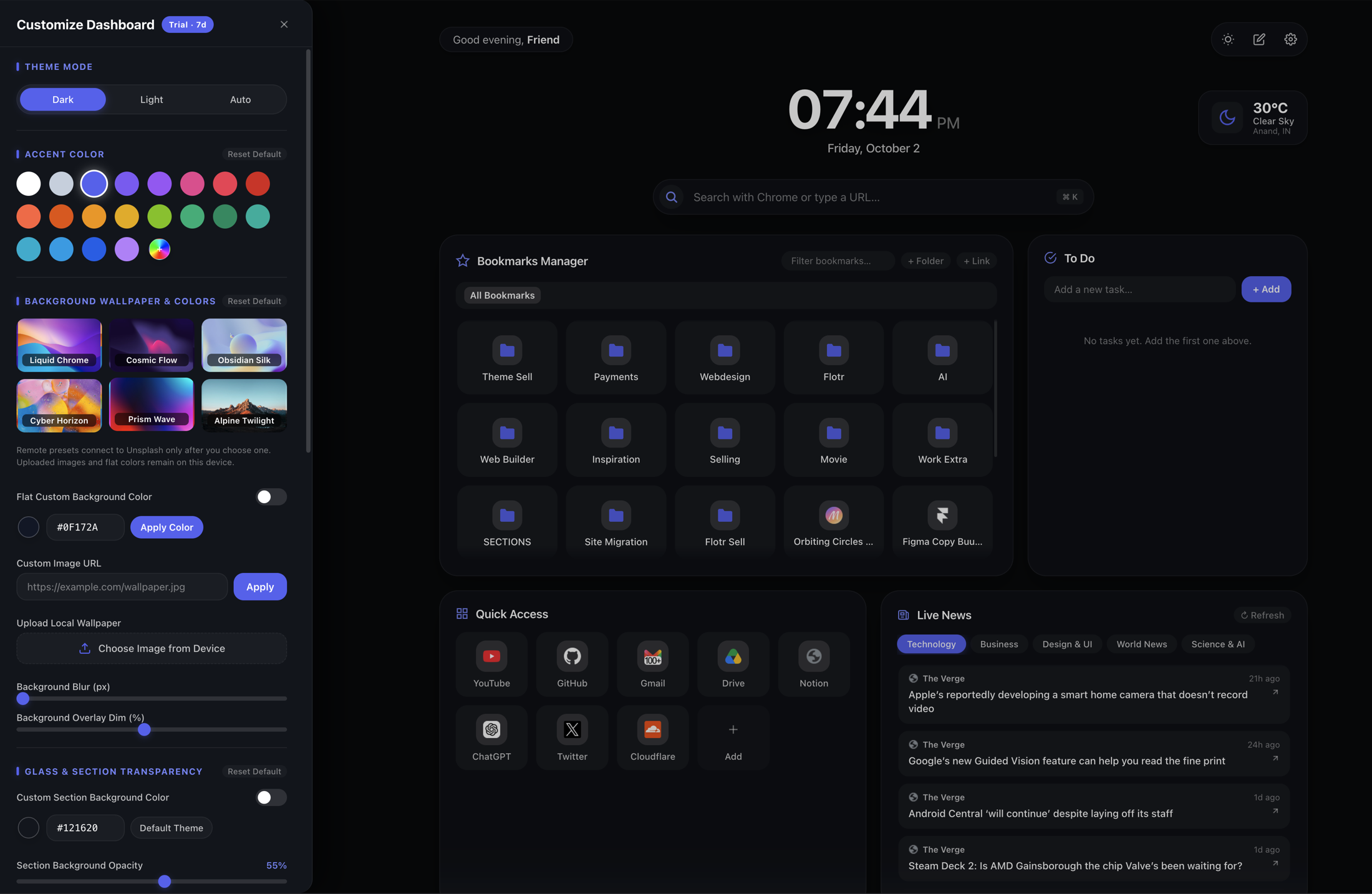
Start with colors and backgrounds
Open Zenith’s Settings button to see Customize Dashboard. The panel contains accent colors and background options, including wallpapers, a flat background color, a custom image URL, and a local wallpaper upload.
Accent colors and backgrounds are part of Zenith Free. This lets you personalize the appearance while keeping the standard dashboard layout. If you choose an online image, the image provider receives the request needed to load it. A local image and a remote image do not have the same network behavior.
Use a background that leaves the clock, search, bookmark names, and task text easy to read. The dashboard also offers theme and appearance controls; deeper section styling is part of Pro.
Move and resize dashboard sections with Pro
- Open Zenith in a new tab and start the Pro preview, or activate your Pro licence.
- Choose the layout-edit button near Settings. The page displays Layout Mode Active.
- Use a section’s drag handle to move it. Pull the bottom-right resize corner to change its width.
- Choose Done Editing when you are finished. Use Reset Default in layout mode to restore the default arrangement.
The layout controls arrange dashboard sections such as Bookmarks Manager, To Do, Quick Access, and Live News. They do not modify Chrome’s toolbar or rearrange Chrome’s own browser tabs.
What does the seven-day preview include?
The preview unlocks the Pro controls without requiring a card. These include moving and resizing sections, showing or hiding widgets, section background color, opacity and glass styling, and bookmark display layouts.
When the preview ends, Pro-only controls lock and Zenith Free continues. Your custom setup is saved for a later upgrade, but Pro-only arrangements and styling are not promised to remain active in Free. See the plan comparison before choosing a paid licence.
Is Zenith Pro a subscription?
No. The advertised Zenith Pro price is $12 USD as a one-time payment for a personal licence on up to three devices. Paddle manages checkout, applicable sales taxes, and receipts.
“Lifetime” means Pro access for as long as Zenith remains available and supported; it does not guarantee perpetual development or compatibility. Read the licence terms and refund policy for the purchase conditions.
Will my dashboard follow me to another computer?
Layouts, preferences, tasks, and shortcuts are stored locally in your Chrome profile. Zenith does not automatically synchronize your full workspace between computers. Real Chrome bookmarks remain part of Chrome’s bookmark collection, with cross-device bookmark behavior controlled by your Chrome settings.
For the complete installation and personalization walkthrough, read how to set up Zenith in Chrome.